On-Page SEO Checklist for Higher Google Rankings in 2026
Ranking a website is rarely about making one dramatic change. In most cases, better visibility comes from improving dozens of small elements that help search engines understand a page and make it easier for visitors to use. A practical On Page SEO Checklist brings those elements together so that nothing important is overlooked during content creation or website optimization.
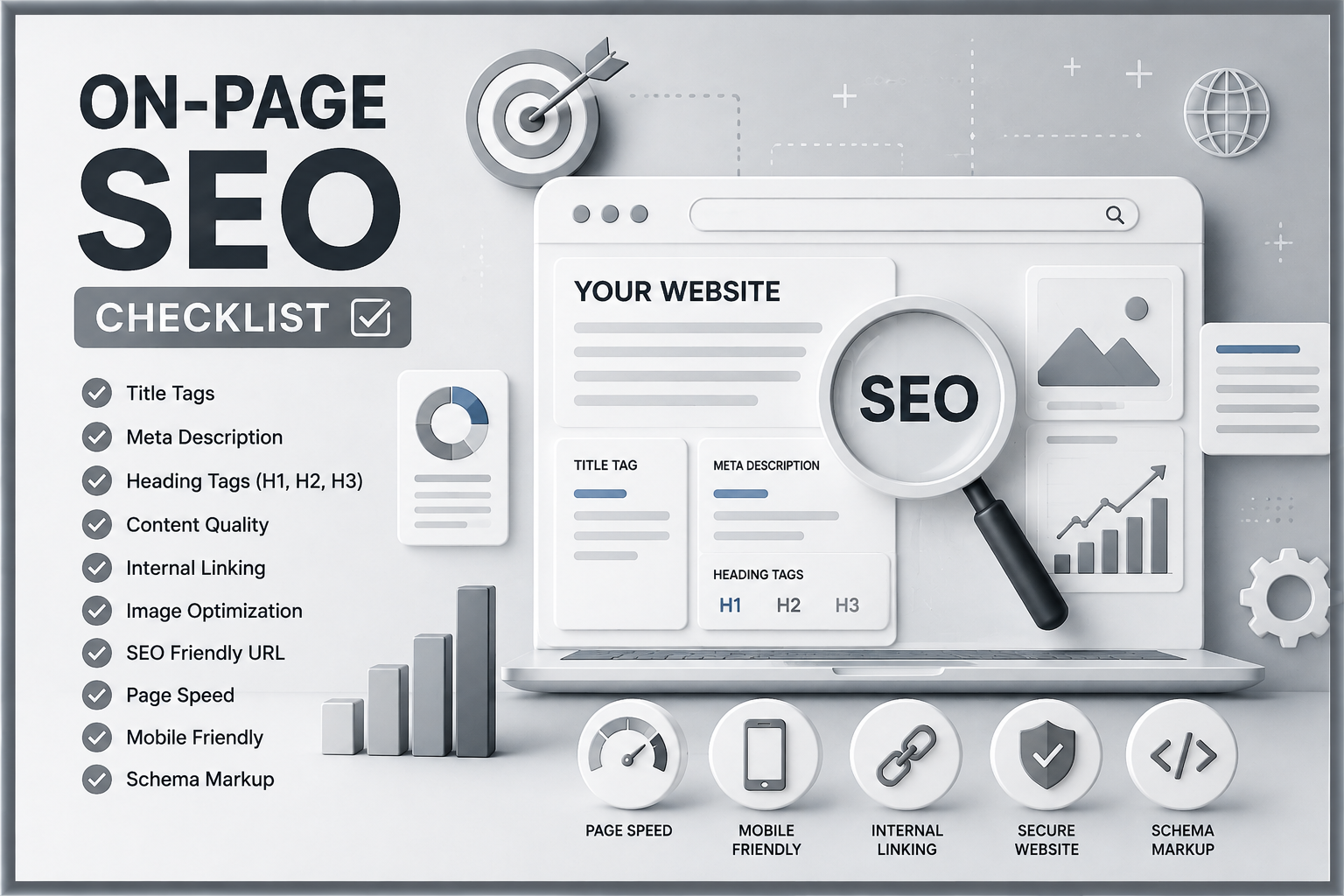
On-page optimization includes much more than placing a keyword in a title. It covers search intent, content quality, headings, internal links, images, URLs, page experience, mobile usability and trust signals. When these elements work together, a page becomes clearer for Google Search, more useful for readers and better prepared to appear in traditional results, featured snippets and AI-generated answers.
This guide explains each important step in practical language so that business owners, marketers and website managers can review their pages with confidence. For a broader understanding of search engine optimization, you can also explore our SEO Services in Ranchi guide.
What Is On-Page SEO?
A Simple Definition
On Page SEO is the process of improving the content and visible or underlying elements of an individual webpage. The goal is to help search engines understand what the page covers while giving visitors a clear, relevant and comfortable experience.
It includes title tag optimization, meta descriptions, heading tags, written content, image SEO, internal linking, URL structure and basic page-experience improvements. You control most of these elements directly, which makes on-page work one of the most practical areas of search engine optimization.
On-Page SEO vs Off-Page SEO
On-page work happens on your own website. Off-page SEO involves external signals such as backlinks, brand mentions, digital PR and local citations. Both matter, but strong backlinks cannot fully compensate for a confusing, thin or poorly structured page. A sound website should first provide relevant content and a dependable user experience before investing heavily in external promotion.
Why On-Page SEO Matters in 2026
Clear Relevance for Search Engines
Search engines evaluate the complete context of a page rather than relying on one keyword. They examine the title, headings, supporting terms, links, page structure and the depth of the explanation. When all these signals consistently support one subject, the page is easier to interpret and match with relevant searches.
A Better Experience for Visitors
Good optimization also improves usability. Descriptive headings help people scan the article, short paragraphs reduce reading effort and fast-loading images prevent frustration. A well-organized page encourages visitors to stay longer, explore related resources and take meaningful actions.
Visibility in AI Search and Answer Engines
AI-powered search systems prefer content that answers specific questions clearly and supports those answers with useful context. Direct definitions, logical headings, concise summaries and trustworthy explanations make content easier to understand and reference. However, content should still be written primarily for people rather than mechanically formatted for an algorithm.
Complete On-Page SEO Checklist
1. Begin With Focused Keyword Research
Keyword research should reveal how your audience describes a problem, service or question. Select one primary topic and a small group of closely related terms. Avoid targeting several unrelated keywords on one page because this weakens relevance and usually produces a shallow article.
Review the current search results before writing. Notice whether Google is showing guides, service pages, product pages, videos or local listings. This gives you a practical view of the format users are likely expecting. A detailed Keyword Research Guide can later support this stage of your SEO process.
2. Match the Search Intent
Search intent is the reason behind a query. A person may want information, a comparison, a nearby provider or a service they can purchase. Your page type and message must match that purpose. For example, a search for “how to optimize a title tag” needs an instructional answer, while “SEO agency in Ranchi” is more likely to require a service-focused page.
Do not force a sales page to rank for a purely educational query. You can include a relevant call to action, but the main content must first satisfy the visitor’s original need.
3. Write a Clear and Useful Title Tag
The title tag should accurately describe the page and give users a reason to click. Include the main subject naturally, preferably near the beginning, but avoid repeating keywords or using exaggerated promises. Keep the most meaningful wording visible because long titles may be shortened in search results.
A useful title is specific. “SEO Tips” is vague, while “On-Page SEO Tips for Small Business Websites” tells the reader exactly what to expect.
4. Create a Relevant Meta Description
A meta description does not need to contain every keyword. Its job is to summarize the page and encourage an appropriate click. Explain what the visitor will learn or gain, keep the wording natural and ensure the description reflects the actual content. Misleading descriptions may attract clicks but usually create disappointment.
5. Maintain a Logical Heading Structure
Use one clear H1 for the main title. Divide major sections with H2 headings and use H3 headings for supporting points within those sections. Headings should describe the content below them rather than acting as decoration.
There is no fixed number of headings required for ranking. Use enough to make the article easy to follow, but do not create unnecessary headings for every short sentence.
6. Use an SEO-Friendly URL
A good URL is short, readable and connected to the page topic. Use lowercase words separated by hyphens and remove unnecessary dates, numbers or filler words where possible. For example, /on-page-seo-checklist is clearer than a long URL containing random characters.
Avoid changing an established URL without a valid reason. When a change is necessary, use a proper redirect so visitors and search engines reach the new location.
7. Create Content That Completes the Visitor’s Task
Content quality is not measured only by word count. A useful page answers the main question, explains important details, anticipates follow-up concerns and helps the visitor decide what to do next. Remove sections that repeat the same thought in different words.
Use original explanations, relevant examples and practical instructions. Where a claim requires evidence, reference an authoritative source. Do not invent statistics or case studies merely to make the article appear more convincing.
8. Optimize Images Without Reducing Quality
Large images can slow a page significantly. Resize each image according to the space in which it will appear, compress it and use an efficient format such as WebP where appropriate. Give the file a descriptive name before uploading instead of keeping a name such as IMG_0045.
Alt text should briefly explain the image for users who cannot see it. It should describe the actual visual, not serve as a place to repeat keywords. Decorative images can use empty alt attributes when they add no informational value. A dedicated Image SEO Guide can cover compression, filenames, dimensions and accessibility in greater depth.
9. Build Helpful Internal Links
Internal linking connects related pages and helps visitors discover useful information. Link from descriptive phrases rather than repeatedly using vague text such as “click here.” For example, a paragraph about website performance can naturally point to a future Technical SEO Guide.
Important pages should not remain isolated. Review older articles whenever you publish a new guide and add relevant links in both directions. You can browse more educational resources in the website blog.
10. Use External Links Selectively
External links can support a definition, official guideline or factual claim. Link to sources that are trustworthy and directly relevant. Do not add links merely to make the article appear researched, and avoid sending users to weak or unrelated pages.
11. Add Appropriate Structured Data
Schema markup gives search engines structured information about a page, such as whether it represents an article, organization, product or local business. Use only schema that matches the visible content. Marking information that users cannot see may create errors or trust issues.
Structured data can improve eligibility for certain search features, but it does not guarantee enhanced results or higher rankings. It should support a strong page rather than replace one.
12. Improve Page Speed and Core Web Vitals
Start with the elements that usually create the greatest delay: oversized images, unused scripts, heavy fonts, unnecessary plugins and weak server response. Compress files, enable caching and load non-critical resources only when needed.
Core Web Vitals evaluate loading performance, visual stability and responsiveness. Treat these measurements as indicators of real usability rather than scores to chase blindly. Test important page templates on mobile devices and slower connections, not only on a fast office computer.
13. Make the Page Mobile-Friendly
Text should remain readable without zooming, buttons should be easy to tap and content should fit the screen without horizontal scrolling. Forms must be short and usable, while intrusive pop-ups should not block the main information. Mobile testing is essential because a page that looks polished on a desktop may still be difficult to use on a phone.
14. Improve Readability and Navigation
Use concise paragraphs, meaningful subheadings and plain language. Lists are useful when presenting steps or comparisons, but they should not replace proper explanations. Long guides may benefit from a table of contents that helps readers jump directly to the section they need.
15. Format Key Answers Clearly
To improve suitability for featured snippets and AI answers, place direct responses near relevant questions. Follow the short answer with a fuller explanation, examples and limitations. This structure serves readers who want a quick response as well as those who need deeper guidance.
16. Demonstrate Experience and Trust
Trust grows when content is accurate, transparent and connected to a genuine business. Keep company details consistent, maintain clear About and Contact pages, and explain services without making unrealistic promises.
Update articles when tools, interfaces or best practices change. Content freshness does not mean changing the publication date without improving the page; it means reviewing accuracy, replacing outdated advice and filling genuine information gaps.
Common On-Page SEO Mistakes and How to Fix Them
Repeating the Primary Keyword Too Often
Keyword repetition can make content awkward without improving its usefulness. Write naturally, cover related questions and use terminology that fits the subject. If the same phrase appears in nearly every paragraph, revise the copy for clarity.
Publishing Thin or Generic Content
Rewriting information already available on hundreds of websites gives users little reason to choose your page. Add practical context, explain implementation and answer the questions that competing pages leave unresolved.
Using Duplicate Titles and Descriptions
Every important page should have a title and description that reflect its individual purpose. Duplicate metadata makes pages harder to distinguish and may reduce the relevance of search snippets.
Ignoring Internal Links and Broken Pages
A useful article can still underperform when it has no contextual links or points to missing pages. Check internal links periodically, repair broken destinations and connect related guides through meaningful anchor text.
Practical On-Page SEO Best Practices
Optimize One Page Around One Main Purpose
Decide what the page should achieve before writing. A page may educate, compare, generate an enquiry or describe a service, but its central purpose should remain clear. This makes the message more focused and helps you select an appropriate call to action.
Review the Page as a Visitor
After completing the technical checks, read the page from beginning to end. Ask whether the introduction sets clear expectations, whether each section adds value and whether the next step is obvious. Search optimization should improve communication, not make it sound unnatural.
Measure and Improve Gradually
Use performance data to identify pages that receive impressions but few clicks, attract traffic but generate little engagement or have lost visibility over time. Improve the title, introduction, depth or internal links based on the actual weakness rather than rewriting everything without a clear reason.
Why Businesses May Need Professional On-Page SEO
Business websites often contain service pages, blogs and landing pages created at different times by different people. As a result, titles may overlap, internal links may be missing and valuable pages may not clearly target the searches most relevant to the business. A professional review brings content, technical structure and conversion goals into one consistent plan.
One Pixel Production helps businesses evaluate page structure, content relevance and website performance without relying on unrealistic ranking promises. You can review the agency’s digital marketing services or discuss your website through the contact page.
Conclusion
Effective optimization is the result of clear content, logical structure and a dependable page experience. Start with search intent, create useful information, organize it with accurate headings and then improve titles, descriptions, links, images, speed and mobile usability.
You do not need to repair every page in one day. Begin with the pages that matter most to your business, apply this On Page SEO Checklist, monitor their performance and improve them gradually. Consistent, evidence-based work is more valuable than frequent changes made only to satisfy an SEO score.
Frequently Asked Questions
1. How often should on-page optimization be reviewed?
Review important pages whenever business information, search behaviour or industry guidance changes. A broader content review every few months can identify outdated sections, broken links and pages that need stronger explanations.
2. Can on-page improvements rank a website without backlinks?
Some pages can perform well through strong relevance, useful content and limited competition. In more competitive markets, backlinks and broader authority may also be necessary. On-page quality remains the foundation because external promotion works best when the destination page is genuinely valuable.
3. Should the exact keyword appear in every heading?
No. Headings should describe their sections naturally. Repeating the same phrase in every heading can reduce readability and appear forced. Use related wording when it helps readers understand the topic.
4. Is a high SEO plugin score enough to guarantee rankings?
No. Plugin scores are basic guidance tools, not Google ranking guarantees. A page can receive a high score and still fail to satisfy search intent, demonstrate expertise or compete with stronger resources.
5. How long does it take to see results after updating a page?
The timeline varies according to competition, crawl frequency, website authority and the significance of the improvements. Some changes may be reflected after the page is recrawled, while meaningful ranking growth can take longer. Track impressions, clicks, engagement and enquiries instead of judging success from one keyword alone.